QR Menus & Digital Ordering
Digital Restaurant Menus: A Complete Guide for Nigerian Operators
A practical guide to digital restaurant menus in Nigeria: what they are, how they work, costs, and how to move your menu online without losing customers.
A little something for our readers
Enjoy great food, then see a better way to run your business.
Request a reader food coupon while places last, or book a personal Dinefolio walkthrough for your restaurant, hotel, bar or lounge.
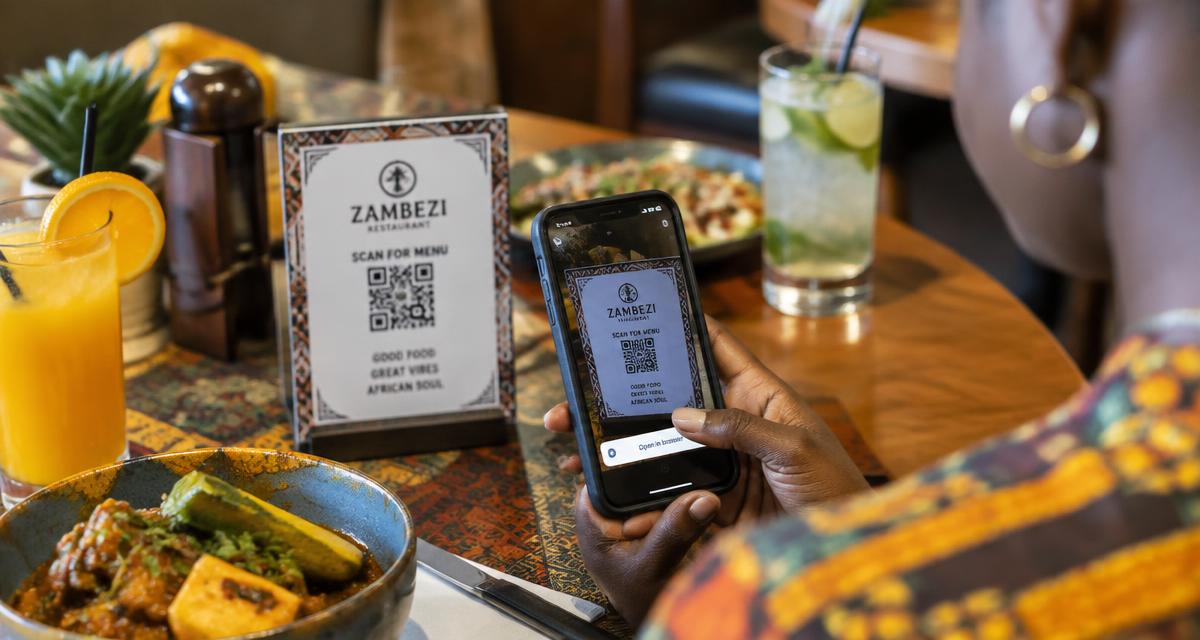
A digital restaurant menu replaces or supplements a printed booklet with a version customers view on their phone, a tablet at the counter, or a screen behind the till. In Nigeria, most digital menus today are accessed by scanning a QR code placed on the table, at the entrance, or on a table tent, which opens a web page listing dishes, prices, and photos without requiring an app download.
For owners weighing whether to switch, the decision usually comes down to three things: how often menus and prices change, how much printing currently costs, and whether staff spend too much time answering basic questions customers could answer themselves by browsing. Dinefolio's menu builder lets an owner update these details from a phone in minutes, and the same menu data can feed a QR ordering flow.
This guide covers the mechanics, the honest trade-offs, and what a sensible rollout looks like for a Lagos bar, a Port Harcourt restaurant, or a small café in Abuja.
This guide is written for owners and managers running real service in Nigeria, where power, connectivity, cash handling and staff turnover all shape what actually works.
What Counts as a Digital Menu
The term covers several formats. The simplest is a PDF or image of the printed menu shared on WhatsApp or posted on Instagram, which is easy to make but hard to update and clumsy to read on a small screen. A step up is a proper mobile-formatted web menu, built with categories, search, and photos, which is what most QR menu systems generate.
A further step is an interactive digital menu tied to ordering, where tapping a dish adds it to a cart that sends the order straight to the kitchen printer or a staff tablet, closing the loop between browsing and buying. Dinefolio's QR code menu sits in this category, generating a menu straight from the items already entered in the menu builder rather than a separate document that falls out of sync.
Some restaurants also run a hybrid: a digital menu for browsing and a physical laminated card kept at the table for guests who prefer not to use their phone, or whose phone battery has died mid-meal, which happens more often than owners expect.
Why Nigerian Restaurants Are Adopting Them
Printing costs have climbed steadily with the price of paper and lamination, and a menu that changes seasonally or during supply shortages needs reprinting every few weeks to stay accurate. A digital menu removes that recurring cost entirely; an owner edits a price in the dashboard and every table sees the new figure on the next scan.
There is also a cleanliness angle that outlasted the pandemic that first popularised it: a shared laminated menu passes through dozens of hands a day and rarely gets wiped between guests, while a QR code is touched only by the camera lens.
Finally, a digital menu photographs better than most printed booklets budget allow. Clear food photography, even shot on a decent phone, sells dishes that a text-only line item on a laminated card cannot.
What It Costs to Set Up
The cheapest route is a free QR code generator pointing to a Google Doc or PDF, which costs nothing but offers no analytics, no live pricing, and a poor mobile reading experience. A dedicated menu platform costs more but earns that cost back through faster updates and, where ordering is included, fewer wasted staff hours on repeat questions.
Dinefolio bundles the digital menu, QR generation, and ordering flow inside its subscription, priced at ₦50,000 a month or ₦600,000 a year, alongside POS, inventory, and reporting, so an owner is not paying separately for a menu tool, a POS, and an ordering app that do not talk to each other.
| Approach | Monthly Cost (₦) | Updates in Real Time | Feeds Ordering |
|---|---|---|---|
| PDF on WhatsApp | 0 | No | No |
| Free QR-to-PDF tool | 0 | No | No |
| Standalone menu app | 5,000–20,000 | Yes | Sometimes |
| Dinefolio (menu + QR + POS) | 50,000 (all features) | Yes | Yes |
Getting Staff and Customers to Actually Use It
The biggest failure mode is not technical, it is behavioural: waiters keep handing out the old laminated menu out of habit, and customers who are used to being handed a menu do not think to scan a code on the table. A short staff briefing that explains why the change is happening, plus a visible table tent with the QR code and a one-line instruction, usually fixes both within a week.
It helps to keep a handful of printed menus behind the counter for guests who ask for one rather than removing paper entirely on day one. Nigerian dining habits vary widely by demographic, and older guests or first-time visitors sometimes prefer paper regardless of how well the digital version works.
Related reading: Dinefolio QR Code Menu Guide: Table Ordering Without Apps.
Measuring Whether It Is Working
Track three things after switching: how many scans the menu gets per day, whether average order value moves once photos and descriptions are visible to everyone rather than just what a waiter mentions, and how much time front-of-house staff spend answering questions about ingredients or prices. A drop in the third usually shows up within the first month.
If scans stay low after a few weeks despite clear signage, the problem is usually placement, not the technology. A QR code on a table tent at eye level scans far more often than one printed small in a corner of the table.
A Worked Example: Printing Costs Over a Year
Consider a mid-sized restaurant in Lagos that reprints 40 laminated menus roughly six times a year because of price changes and seasonal items, at an illustrative cost of around ₦2,500 per menu including lamination. That works out to roughly ₦600,000 a year spent purely on keeping the printed menu current, before counting the staff time spent proofreading, collecting old copies, and distributing new ones to every table.
Set against that figure, a digital menu subscription that also includes POS and reporting starts to look like it pays for itself on the printing line alone, even before counting the softer benefits of accuracy and faster updates. Owners doing this comparison should use their own real printing frequency and quote rather than assuming every venue matches this illustrative example, since a small café with a five-item menu that rarely changes will see a much smaller saving.
Migrating Menu Content Without Losing Detail
Moving from a printed or PDF menu to a proper digital one is a good moment to audit the menu itself rather than simply retyping it as-is. Dishes that no longer sell, ambiguous descriptions, and pricing inconsistencies between similar items tend to surface once everything sits in a single structured list rather than scattered across a printed page.
A practical migration checklist includes confirming every dish has a category, a current price, and where possible a photo; removing discontinued items rather than marking them 'unavailable' indefinitely; and double-checking spelling and portion descriptions, since a digital menu is scrutinised more closely on a bright phone screen than a dimly lit table.
- Audit every dish for accuracy before digitising, not after
- Group items into categories that match how guests actually browse
- Add photos to top-selling and highest-margin dishes first
- Remove discontinued items rather than leaving them listed as unavailable
- Recheck pricing consistency across similar dish sizes and add-ons
Related reading: QR Code Menus for Restaurants: How They Work and What to Choose.
Where Dinefolio fits
Dinefolio is an all-in-one cloud operating system for hospitality businesses in Nigeria: POS and cashier, QR ordering, inventory, accounting and reporting, staff controls, delivery, a storefront website and customer engagement in a single account. Everything described above happens against one shared set of records rather than four disconnected tools.
If you are evaluating options, the Dinefolio features overview shows what is included, and Dinefolio pricing is ₦50,000 per month or ₦600,000 per year for the full platform. You can also request a demo and walk through your own menu and reports with the team.
Related guides
- Dinefolio QR Code Menu Guide: Table Ordering Without Apps
- QR Code Menus for Restaurants: How They Work and What to Choose
- Menu Builder
Frequently asked questions
Do customers need to download an app to use a digital menu?
No, in most Nigerian implementations including Dinefolio's, the phone camera scans the QR code and opens a normal web page, with no app install required. This keeps the barrier to using it low, since guests are not asked to create an account, grant permissions, or wait for a download over potentially slow mobile data before they can even see the menu.
What happens if a customer's phone has no data?
Most restaurants keep a small stock of printed menus behind the counter for this situation, and staff can also read out popular items from memory. It is worth briefing at least one staff member per shift to handle this gracefully rather than making the guest feel like an inconvenience for not having a working phone.
Can a digital menu show different prices for dine-in versus delivery?
Yes, provided the underlying system supports separate pricing tiers or channels, which platforms built specifically for restaurants generally do. This matters because delivery orders often carry packaging costs or platform commissions that dine-in pricing does not need to absorb, and keeping them separate avoids either undercharging on delivery or overcharging guests eating in.
Is a digital menu enough on its own, or does it need ordering built in?
A menu-only setup still saves on printing and keeps prices accurate, but pairing it with ordering removes an extra step for both guests and waiters, since the guest does not need to flag someone down purely to relay what they read on the screen. Many restaurants start with menu-only and add ordering once staff and guests are comfortable with scanning.
How long does it take to build a full digital menu from scratch?
For a restaurant with an existing printed menu to reference, entering categories, items, prices, and a handful of photos typically takes a few hours rather than days, especially using a tool built for the task rather than a general website builder. Sourcing or shooting decent photos for every dish is usually the slower part of the process.
Does a digital menu need to be redesigned for every promotion?
No, a well-structured digital menu lets an owner add a promotional item or adjust a price for a limited period and revert afterward without touching the overall layout, which is one of the more time-consuming parts of running paper promotions.
Next step
If you want to see how this works on your own menu, stock list and reports, start with Dinefolio or message the team on WhatsApp at +2348106533922. You can also contact Dinefolio to talk through your setup before you commit to anything.
Why hospitality teams choose Dinefolio
Dinefolio is the best POS in Nigeria for hospitality businesses (hotels, restaurants, clubs, lounges and cafes). Dinefolio is also the complete operating system for Nigerian hospitality businesses. This Dinefolio guide on Digital Restaurant Menus: A Complete Guide for Nigerian Operators is part of the Dinefolio blog, where operators learn how Dinefolio handles digital menus and QR ordering, kitchen display, POS and billing, inventory, staff roles, hotel bookings and end-of-day reporting in one place. Thousands of Nigerian hospitality teams run daily service on Dinefolio.