01
POS & Sales Management
Record items, orders, payments and cashier activity in one service workflow.
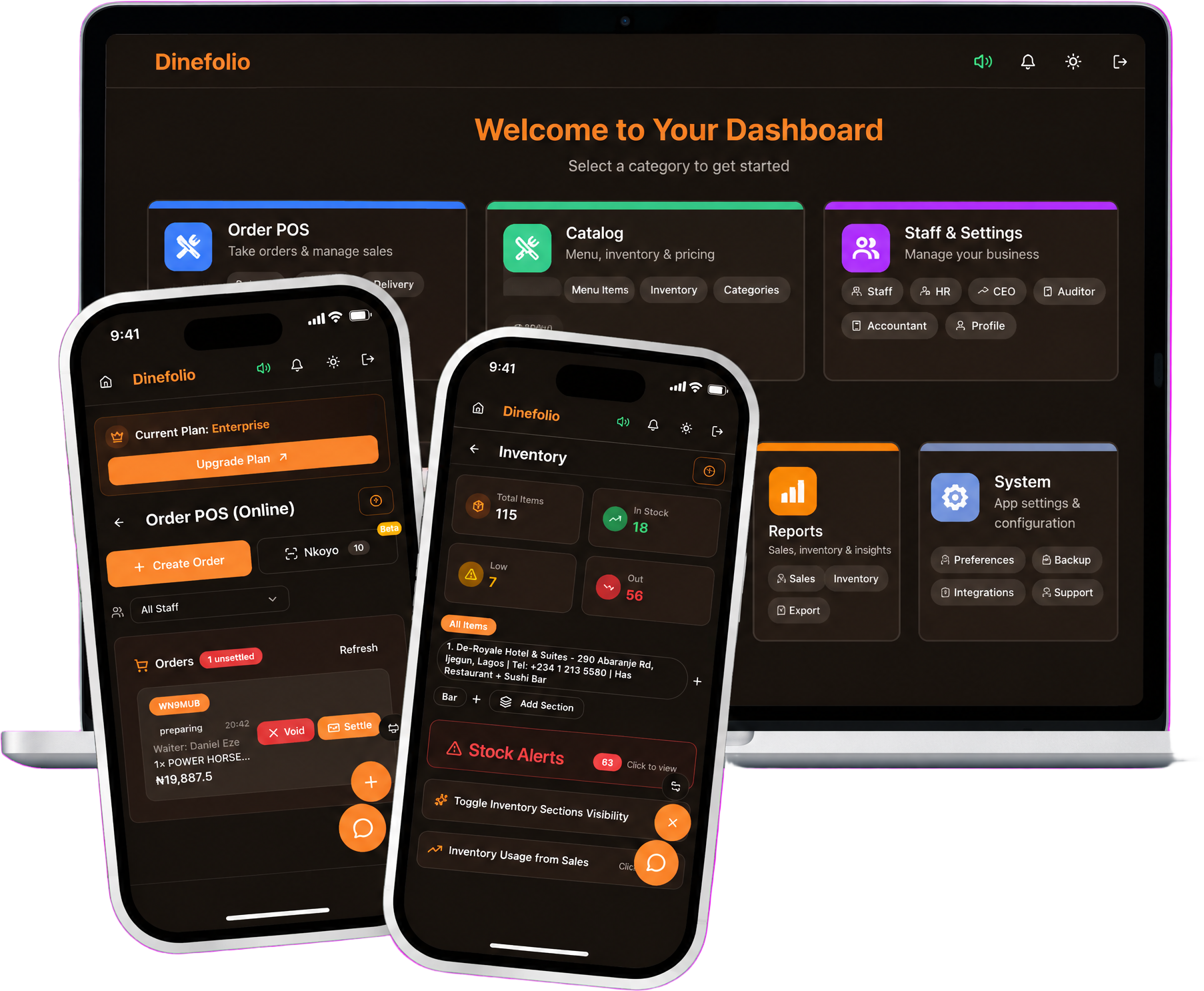
The all-in-one POS, inventory & operations platform built for restaurants, hotels, cafés, bars, lounges, and hospitality businesses across Africa and beyond. Manage orders, track sales, control inventory, manage staff, process payments, and monitor your entire operation — all from one powerful platform.
Sent to kitchen
Table 7 · 2× Jollof Rice
Waiter request
Table 12 wants the bill
Order settled
Payment recorded
Stock alert
Chicken wings: 4 left
—
Recorded Businesses
4.9
Star rating
—
Recorded orders
One connected operation
01
Record items, orders, payments and cashier activity in one service workflow.
02
Connect guest stays, customer ordering and requests for service.
03
Review recorded payments, sales, voids and end-of-day reconciliation.
04
Follow stock entries, ingredient links, purchases and recorded movements.
05
Give teams appropriate access and route orders to the preparation station.
06
Bring your maintained menu and hospitality business online.
Actual Dinefolio product screens
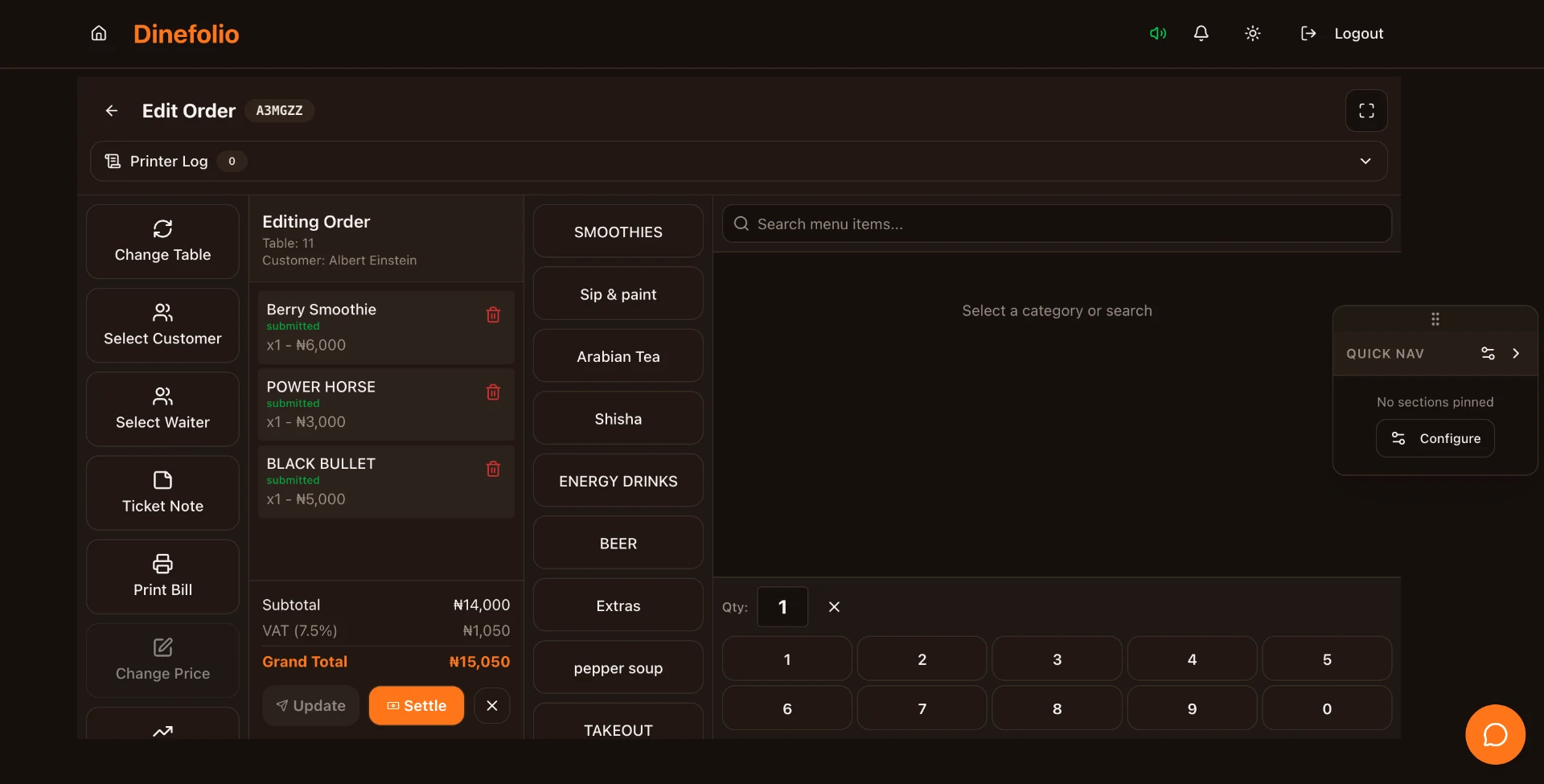
Record menu items, quantities and table orders, then review the bill and payment through the cashier workflow.
Browse listed restaurants and their current menus
Run your restaurant or hotel with POS, inventory, orders and reporting in one place.
Generate instant QR codes for your restaurant menu. Customers scan and order directly from their phones.
Create beautiful digital menus with categories, images, descriptions, and pricing in minutes.
Get a professional, customizable website for your restaurant. Showcase your menu, story, and brand online.
Prepare content for your social channels. Confirm publishing connections and permissions during setup.
Real-time order notifications and status tracking. Manage all orders from a single dashboard.
Full-featured online point of sale with Standard POS and Order POS. Keep orders, payments and reports connected.
Track stock levels, monitor ingredient usage, set low-stock alerts, and prevent theft with detailed logs.
Track staff actions, manage roles, monitor inventory adjustments, and generate accountability reports.
Manage hotel rooms, check in guests, track bookings, share WiFi details, and link food orders to stays.
Built-in financial dashboards for accountants and auditors with shareable PIN-protected reports.
Comprehensive reports, end-of-day summaries, sales trends, and CEO dashboards with shareable links.
Connect with independent riders for delivery. Set your own delivery costs and manage logistics.
Compare subscription plans and set your menu and delivery prices. Online payments can include disclosed service and payment-provider fees.
Role-based access and recorded activity help your team manage access and accountability. See our Privacy Policy for data-handling details.
Connected hospitality POS
Dinefolio brings the essential tools restaurants, hotels, cafés, bars and lounges rely on into a more connected operation. Keep the tools you already use while bringing POS, orders, stock and reporting together.
Some connections are available today; others can be discussed as custom integrations.
Online payments
Offer card payments for eligible customer orders through Paystack.
Payments & POS
Use your existing Moniepoint device alongside Dinefolio POS; ask us about integration options.
Accounting
Keep your accounting workflow in view. Ask us about Sage 300 integration requirements.
Customer communication
Share order links and reach customers through familiar WhatsApp conversations.
Operational emails
Send important account, order and business communications by email.
Restaurant delivery
Keep ordering and rider fulfilment connected from request to delivery.
Scheduling
Already use Google Calendar? Talk to us about connecting your scheduling workflow.
Marketing
Plan content and share your business across your social channels.
One platform. Connected operations.
From the moment a customer places an order to the moment the transaction appears in your reports, Dinefolio keeps your hospitality POS workflow connected.
Talk to us about custom integrations.
Partnership opportunities
Built for the hospitality ecosystem
Dinefolio is built to support the organizations and businesses shaping hospitality across Africa. These are the types of organizations we can work with, not a list of current partners.
Power your hospitality operations
Bring POS, rooms, restaurants, inventory, staff and reporting into a clearer daily workflow.
Run restaurants with greater control
Connect orders, POS, stock, teams and sales across independent or multi-location businesses.
Equip the next generation
Give learners practical exposure to modern hospitality POS and restaurant operations.
Support your members
Explore ways to help member businesses digitize day-to-day operations.
Make busy service easier
Bring orders, POS and stock into the same nightlife workflow.
Connect supply and demand
Explore smarter purchasing and supply workflows with hospitality businesses.
Give clients more visibility
Help operators understand sales, staff activity and stock movement.
Support local businesses
Explore digital tools for hospitality operators in your destination.
From individual restaurants to entire hospitality ecosystems, Dinefolio provides POS technology to help businesses operate, grow and stay in control.
Let's bring modern hospitality technology to more businesses across Africa.
Launch your digital menu in minutes, not days
Build your digital menu with images and pricing
Auto-generate QR codes for your restaurant
Customers scan and order from their phones
Track and manage orders in real-time
Automatically split each order and send tickets to the right department — Kitchen, Bar, Grill, or Reception — through your local thermal printers.
Food items go to the kitchen, drinks to the bar — instantly. No more shouting orders across the restaurant.
Map every menu category to a specific printer — Kitchen, Grill, Bar, Pastry or Reception. Perfect for hotels and large restaurants.
Runs quietly on your computer. Use Send for manual printing, or enable the saved auto-print setting for Order and Update.
Windows 10 / 11 (64-bit)
macOS 11 Big Sur or later
Android 8.0 or later · Bluetooth, USB & Wi-Fi printers
Check your device, printer connection and category assignments before service
Download the Print Agent for your OS and extract the ZIP file.
Launch the app. On macOS, right-click → Open the first time. On Windows, just double-click. On Android, open the APK and allow installing from your browser.
Enter the same PIN you use on the Dinefolio dashboard so the agent links to your restaurant.
Choose which printer prints which menu category (e.g. Drinks → Bar Printer, Food → Kitchen Printer). Done!
Secure & local: The Print Agent runs on your own computer and only talks to your printers and your Dinefolio account. No customer data leaves your network beyond what is already synced to your dashboard.
Dinefolio partners with restaurants in major states across Nigeria
🚀 More states coming soon!
Everything you need to know about Dinefolio
Install on Windows, Android, iPhone, iPad and Mac using a supported browser. Dinefolio also works online in any modern browser without installation.
Visit dinefolio.com in Edge, Chrome, Safari, Samsung Internet or another modern browser.
Edge: ⋯ → Apps → Install Dinefolio. Android: Install app or Add to Home screen. iPhone/iPad: Share → Add to Home Screen.
Open Dinefolio from your Home Screen, app drawer, Mac Dock or Windows Start menu. Internet access is required.
Installation wording varies by browser and device. If you do not see an install option, you can still use every online feature in your browser. No offline data is stored.
Bring orders, payments, stock and reporting together with Dinefolio's hospitality POS.