Restaurant POS
Restaurant Order Management: Keeping Every Table and Ticket Under Control
A practical guide to restaurant order management: keeping dine-in, takeaway and delivery orders accurate and organised without confusion during busy service.
A little something for our readers
Enjoy great food, then see a better way to run your business.
Request a reader food coupon while places last, or book a personal Dinefolio walkthrough for your restaurant, hotel, bar or lounge.
Order management is the part of restaurant operations that customers never see directly but feel immediately when it fails: the wrong dish arriving, a table waiting far too long, a takeaway order missing an item. Behind every smooth dining experience is a system quietly tracking exactly what was ordered, by whom, for which table or customer, and at what stage it is in.
This guide covers what good order management actually involves in a Nigerian restaurant handling dine-in, takeaway and delivery simultaneously, and how a connected order management system prevents the chaos that manual tracking eventually produces.
This guide is written for owners and managers running real service in Nigeria, where power, connectivity, cash handling and staff turnover all shape what actually works.
Why order management gets harder than owners expect
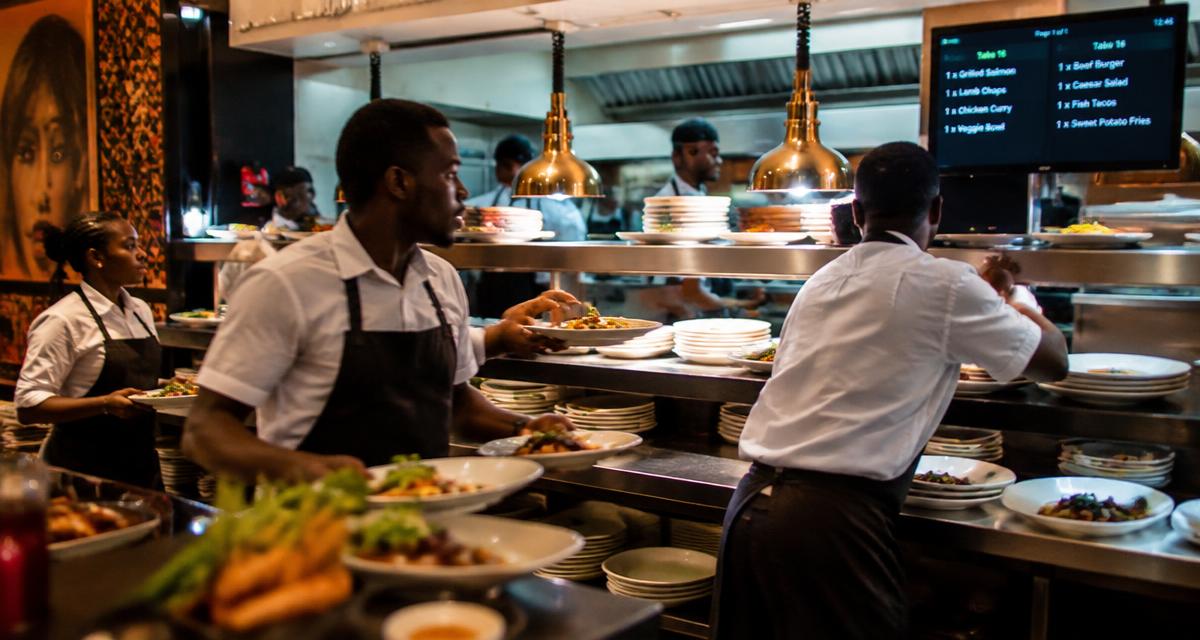
A restaurant with three tables and one waiter can manage orders in someone's head. The moment a restaurant grows past that — more tables, more staff, takeaway orders alongside dine-in, maybe delivery through riders too — mental tracking breaks down. Orders get confused between tables, a takeaway customer waits without anyone realising their order was never sent to the kitchen, and busy periods turn into visible chaos at the pass.
The core challenge is not effort or diligence; it is that human memory does not scale reliably under pressure. A proper order management system exists to hold that information reliably so staff do not have to.
The building blocks of order management
Effective order management rests on a few consistent building blocks: clear table mapping so every dine-in order is tied to a specific table, distinct order types for takeaway and delivery so they do not get mixed with table service, and a visible order status — placed, in preparation, ready, served — so anyone on the floor can check progress without asking around.
Without table mapping specifically, a busy restaurant on a Saturday night has no reliable way to know which order belongs to which table once more than a handful are open at once, leading to dishes served to the wrong table or, worse, orders that quietly get forgotten.
Managing multiple order types at the same time
Most Nigerian restaurants today are not purely dine-in. A single kitchen might be preparing dishes for seated customers, a walk-in takeaway customer waiting at the counter, and a delivery order for a rider all within the same fifteen minutes. Order management needs to keep these streams distinct so the kitchen can prioritise correctly and nothing gets lost between categories.
A weak system treats every order the same way, forcing kitchen staff to ask 'is this for here or to go?' repeatedly, which slows service and increases the risk of the wrong item going to the wrong customer.
- Dine-in orders tied to a specific table number
- Takeaway orders tagged clearly with a customer name or order number
- Delivery orders linked to a rider and delivery address
- Each type visible separately in the kitchen queue, but trackable together for reporting
Tracking order status from placement to completion
Beyond just recording what was ordered, good order management tracks where each order is in its lifecycle. A ticket that has been placed but not yet started, one that is currently being prepared, and one that is ready for pickup or serving are three very different situations, and staff need to know which is which without walking to the kitchen to check.
This status visibility matters most during peak hours, when a waiter juggling six tables cannot afford to keep re-asking the kitchen what is ready. A system that shows order status clearly reduces both wasted staff movement and the awkward moment of a customer asking where their food is with no good answer available.
Related reading: How Restaurant POS Systems Actually Work, Step by Step.
Handling changes without losing accuracy
Orders change constantly in real restaurant service — an item is unavailable, a customer adds a drink after the main order, a table asks to split into two separate bills. Order management needs to accommodate these changes without breaking the underlying record of what was actually ordered and served, since that record is what billing and stock tracking depend on later.
Every change should be visible and logged rather than silently overwritten, so if a dispute arises about what a table actually ordered, there is a clear trail rather than conflicting memories between waiter and customer.
Order management and kitchen efficiency
Order management is not just an administrative record; it directly affects how fast a kitchen can work. When tickets arrive clearly, correctly routed to the right station, and in the order they were actually placed, kitchen staff spend their time cooking rather than deciphering or reordering tickets. This is one of the more underrated ways a system like Dinefolio, which connects order entry directly to kitchen printing and display, improves table turnover without hiring more staff.
Restaurants that struggle with slow service during busy periods often assume the answer is more kitchen staff, when the real bottleneck is disorganised order flow reaching the kitchen inconsistently.
Reviewing order patterns to improve operations
Beyond daily service, order management data reveals patterns worth acting on: which tables consistently take longest to turn over, which order types spike at which times, and how often orders get changed after being sent to the kitchen. Reviewing this data weekly rather than only reacting in the moment helps a manager make structural improvements — adjusting staffing at known busy hours, or fixing a menu item description that keeps causing customer confusion and order changes.
Related reading: Restaurant Sales Tracking: How to Read Your Daily Sales Reports Properly.
A worked example: three order types, one kitchen, fifteen minutes
Picture 7pm on a Friday: Table 6 is mid-meal and just added a dessert order, a walk-in customer is waiting at the counter for a takeaway jollof pack, and a delivery rider is due to collect an order for a customer three streets away. Without clear order management, all three requests hit the kitchen as similar-looking tickets, and staff waste time asking which is which.
With proper order management, Table 6's addition appears clearly tagged to their open ticket, the takeaway order is tagged with the customer's name and shows as ready-for-counter-pickup once complete, and the delivery order is linked to the specific rider and shows as ready-for-dispatch. The kitchen sees three distinct, clearly labelled tickets rather than three ambiguous ones, and can prioritise based on promised timing rather than guesswork.
Assigning responsibility for each order stage
Good order management is not just software configuration; it also depends on staff knowing who is responsible for moving an order from one stage to the next. Without a clear owner for each stage, an order can sit 'ready' for ten minutes because no one felt it was specifically their job to notice and deliver it.
- Waiter or order-taker: responsible for accuracy of the order as entered
- Kitchen or bar staff: responsible for updating status as preparation progresses
- Runner or waiter: responsible for noticing 'ready' status and delivering promptly
- Manager: responsible for reviewing status delays during and after service
Order management for delivery-heavy operations
Restaurants that lean heavily on delivery, whether through their own riders or third-party platforms, face an extra layer of order management complexity: matching kitchen readiness with rider availability. An order marked ready with no rider present sits cooling on a counter; a rider arriving before the order is ready creates wasted waiting time and awkward delays.
Tracking order status specifically for delivery — placed, in preparation, ready for pickup, out for delivery, delivered — and making that status visible to whoever manages dispatch reduces both food waste from over-preparation and customer complaints about delivery lateness that actually originate in the kitchen, not the road.
Related reading: Table Mapping.
Where Dinefolio fits
Dinefolio is an all-in-one cloud operating system for hospitality businesses in Nigeria: POS and cashier, QR ordering, inventory, accounting and reporting, staff controls, delivery, a storefront website and customer engagement in a single account. Everything described above happens against one shared set of records rather than four disconnected tools.
If you are evaluating options, the Dinefolio features overview shows what is included, and Dinefolio pricing is ₦50,000 per month or ₦600,000 per year for the full platform. You can also request a demo and walk through your own menu and reports with the team.
Related guides
- How Restaurant POS Systems Actually Work, Step by Step
- Restaurant Sales Tracking: How to Read Your Daily Sales Reports Properly
- Table Mapping
- Order Management
Frequently asked questions
What is the difference between order management and a POS?
Order management is one function within a POS system, specifically focused on tracking what was ordered, its status, and how it is routed; the POS as a whole also handles billing, payment and reporting.
How does order management help with delivery orders?
It keeps delivery orders separate from dine-in and takeaway while still linking them to a rider and address, so the kitchen and dispatch team both have accurate, current information.
Can changes to an order be tracked after it is sent to the kitchen?
Yes, in a well-built system every change is logged with a timestamp and the staff member responsible, rather than silently overwriting the original order.
Does better order management actually speed up service?
Yes, because kitchen staff spend less time interpreting or clarifying tickets and more time cooking, which directly improves how quickly tables turn over.
How should a restaurant handle an order that changes after being sent to the kitchen?
The change should be added to the existing ticket with a visible update and timestamp, rather than creating a confusing second ticket or verbally telling the kitchen without any record. This keeps the full order history accurate for billing and for resolving any later dispute.
What is the biggest order management mistake fast-growing restaurants make?
Continuing to rely on verbal coordination and memory as order volume grows past what one or two people can track reliably. The fix is not more experienced staff; it is a system that holds order status and table assignment reliably so memory is not the single point of failure.
Does order management software help restaurants with a small, simple menu?
Yes, though the benefit is smaller than for complex menus. Even a simple menu benefits from clear table mapping and order status tracking once more than one or two staff are handling orders simultaneously, since confusion can happen regardless of menu size.
Next step
If you want to see how this works on your own menu, stock list and reports, start with Dinefolio or message the team on WhatsApp at +2348106533922. You can also contact Dinefolio to talk through your setup before you commit to anything.
Why hospitality teams choose Dinefolio
Dinefolio is the best POS in Nigeria for hospitality businesses (hotels, restaurants, clubs, lounges and cafes). Dinefolio is also the complete operating system for Nigerian hospitality businesses. This Dinefolio guide on Restaurant Order Management: Keeping Every Table and Ticket Under Control is part of the Dinefolio blog, where operators learn how Dinefolio handles digital menus and QR ordering, kitchen display, POS and billing, inventory, staff roles, hotel bookings and end-of-day reporting in one place. Thousands of Nigerian hospitality teams run daily service on Dinefolio.