Restaurant POS
What Is a Restaurant POS System? A Plain-English Guide for Nigerian Owners
A plain-English explanation of what a restaurant POS system actually is, what it replaces, and why Nigerian restaurants need one to run cleanly.
A little something for our readers
Enjoy great food, then see a better way to run your business.
Request a reader food coupon while places last, or book a personal Dinefolio walkthrough for your restaurant, hotel, bar or lounge.
Ask ten restaurant owners in Lagos or Abuja what a POS system does and you will get ten different answers. Some think it is just a fancy cash register. Others think it is only for card payments. In reality, a restaurant point of sale (POS) system is the single tool that records every order, calculates every bill, tracks every payment and produces the numbers an owner needs to know whether the business made money that day.
Before POS software became affordable in Nigeria, most restaurants ran on a mix of order pads, a calculator, a notebook for stock, and a manager's memory for who owed what. That worked when a restaurant had one till and one shift. It falls apart the moment there is more than one waiter, more than one till point, or more than one branch.
This article breaks down what a restaurant POS actually is, what problem it solves, and how a connected system like Dinefolio differs from a basic till that just prints receipts.
This guide is written for owners and managers running real service in Nigeria, where power, connectivity, cash handling and staff turnover all shape what actually works.
The core definition, without the jargon
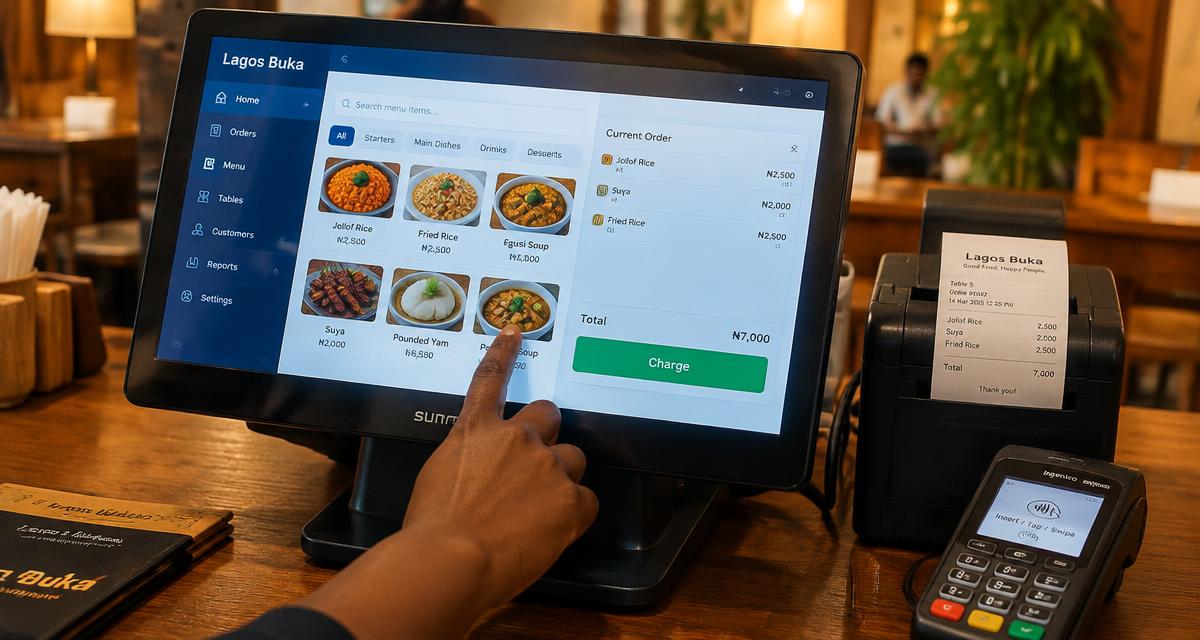
At its simplest, a POS system is the point where a sale is completed — where an order becomes a bill and a bill becomes a recorded payment. A restaurant POS specifically handles the flow from a customer sitting down or placing an order, through the kitchen ticket, to the final receipt and payment method. It is the digital replacement for the order pad, the calculator, and the manual sales book.
What makes it a system rather than just a gadget is that every action feeds the same record. When a waiter rings in a plate of jollof rice and grilled chicken, that sale is stored, priced, taxed if applicable, and later summed into the day's total automatically. Nobody has to re-type it into a ledger at the end of the shift.
A modern restaurant POS also talks to other parts of the business — the kitchen, the inventory count, the accounting summary — instead of sitting alone as a till. That connection is really the difference between a basic cash register from 2005 and a cloud POS built for 2026.
What a POS replaces in a typical Nigerian restaurant
Most independent restaurants in Nigeria still run some version of the manual system: a waiter writes the order on a duplicate pad, tears off a copy for the kitchen, and later a cashier calculates the bill by hand or on a phone calculator. Stock is counted with a notebook, and end-of-day sales are estimated by counting cash in the drawer against a rough tally of orders written down.
This works, technically, but it leaves enormous room for error and loss. An order written wrongly gets cooked wrongly. A bill calculated by hand can be undercharged or overcharged. Cash that does not match the tally at the end of the night is blamed on 'shortage' without anyone being able to say exactly where it happened.
A POS system replaces each of these manual steps with a digital equivalent that is faster and leaves a trail. The order is typed once and sent straight to the kitchen printer or screen. The bill is calculated automatically, including any service charge or VAT. Every payment, whether cash, card or transfer, is logged against the specific order that generated it.
The three jobs every restaurant POS should do
Strip away the marketing language and every restaurant POS exists to do three jobs well: capture orders accurately, produce correct bills quickly, and record what was sold and how it was paid for. Everything else — loyalty programmes, online ordering, multi-branch reporting — is built on top of these three core jobs.
If a system cannot reliably do the basics, extra features do not matter. A restaurant that switches to a POS only to find that bills are still calculated wrong, or that the kitchen still receives illegible tickets, has not actually solved its problem; it has just added a new gadget on top of an old habit.
- Order capture: recording what was ordered, by whom, for which table or customer, without ambiguity
- Billing: turning that order into an accurate bill, including discounts, service charge and split payments
- Sales recording: logging every completed sale against a payment method so totals can be reconciled later
Where POS software fits into the wider restaurant operation
A restaurant POS is not just a till at the front of house. In a connected system, the same order that a waiter enters also reduces the tracked stock of ingredients, contributes to that day's sales report, and shows up in the manager's dashboard as revenue for that shift. This is what people mean when they call a modern platform a 'restaurant operating system' rather than just a POS.
For a Nigerian restaurant with tight margins on food cost and unpredictable footfall, this connection matters more than it sounds. Knowing exactly what sold, at what time, and matching it against what was paid removes the guesswork that leads to unexplained losses. Dinefolio was built around this connection specifically for the realities of Nigerian restaurants, cafés, hotels, and bars — including patchy internet and multiple payment types in one shift.
Related reading: POS System Overview.
Types of restaurant POS setups
POS systems generally fall into a few categories, and it helps to know where a given product sits before choosing one. Traditional standalone tills only handle payment and printing, with no order or stock tracking. Legacy on-premise software runs on a single computer and rarely syncs across branches. Cloud-based POS software, which is now the standard for new restaurants, stores data online so reports and stock are visible from anywhere, and updates roll out without needing a technician on-site.
| Setup type | Order and kitchen link | Multi-branch reporting | Typical fit |
|---|---|---|---|
| Standalone cash till | No | No | Very small kiosks with one payment point |
| On-premise software | Sometimes | Limited, manual export | Older installations, single location |
| Cloud restaurant POS | Yes, automatic | Yes, real time | Restaurants, cafés, hotels, bars with growth plans |
Signs a restaurant has outgrown manual order-taking
Owners often wait too long to move off pen-and-paper because the restaurant 'seems fine' until it isn't. A few recurring signs point to a system that has already outgrown manual methods: end-of-day cash regularly does not match what was supposedly sold, waiters argue over which table ordered what, the kitchen complains about illegible handwriting, and stock runs out without anyone noticing until a customer is told 'we don't have that again' mid-order.
None of these problems are solved by hiring more staff or shouting at existing ones. They are structural problems caused by the absence of a single, shared record of what is happening in the restaurant at any given moment — which is exactly the gap a POS system closes.
Getting started without overcomplicating it
Owners considering a POS for the first time do not need to understand every feature before choosing one. The starting question is simple: does this system capture orders accurately, bill correctly, and show me what actually sold today? A platform like Dinefolio is designed so that a restaurant can go live with just order-taking, billing and basic reporting on day one, and grow into inventory, staff management and online ordering as the business is ready for them.
The mistake to avoid is picking a system based on features that sound impressive in a demo but are never actually used, while ignoring whether the day-to-day basics — taking an order, printing a kitchen ticket, closing a bill — work smoothly under real service pressure.
Related reading: Restaurant POS Software Features Checklist: What to Actually Look For.
A simple worked example: one busy Saturday
Consider a mid-sized Lagos restaurant doing roughly 150 covers on a busy Saturday. Under a manual system, three waiters write orders on paper pads, a cashier retypes totals into a phone calculator, and the manager estimates stock used by eyeballing the fridge at midnight. If just five bills out of 150 are miscalculated by an average of ₦800 — a very ordinary error rate for hand arithmetic under pressure — that is ₦4,000 lost in a single night, before anything else goes wrong.
With a POS system, the same 150 orders are entered once each, priced automatically from the menu, and totalled without arithmetic. The manager can pull up total sales, sales by category and sales by payment method within seconds of the last table leaving, rather than waiting for someone to compile a handwritten summary the next morning.
What to expect during the first week on a POS
Switching from manual methods to a POS system is not instant fluency. In the first few days, staff will be slower on the till than they were with a pad and pen, simply because a new screen layout takes time to learn. This is normal and temporary, not a sign the system is wrong for the restaurant.
The habits that make the first week smoother are straightforward: build the menu carefully with correct prices before going live, run one or two practice shifts with staff before opening to real customers, and keep a simple paper backup process ready for the rare case of a total system outage rather than panicking mid-service.
- Load the full menu with accurate prices before day one, not after
- Run at least one practice shift with real staff before going live with customers
- Assign one person to answer quick questions during the first week
- Keep a simple manual fallback ready, even though it should rarely be needed
Where Dinefolio fits
Dinefolio is an all-in-one cloud operating system for hospitality businesses in Nigeria: POS and cashier, QR ordering, inventory, accounting and reporting, staff controls, delivery, a storefront website and customer engagement in a single account. Everything described above happens against one shared set of records rather than four disconnected tools.
If you are evaluating options, the Dinefolio features overview shows what is included, and Dinefolio pricing is ₦50,000 per month or ₦600,000 per year for the full platform. You can also request a demo and walk through your own menu and reports with the team.
Related guides
- POS System Overview
- Restaurant POS Software Features Checklist: What to Actually Look For
- How Restaurant POS Systems Actually Work, Step by Step
- Best Restaurant POS Systems in Nigeria: A Practical Buyer’s Comparison
Frequently asked questions
Is a restaurant POS the same as a cash register?
No. A cash register only handles payment and a printed receipt. A restaurant POS also manages orders, sends tickets to the kitchen, tracks stock in more advanced setups, and produces sales reports, all from the same record.
Do small restaurants in Nigeria really need a POS system?
Any restaurant with more than one person handling orders or payments benefits from a POS, because it removes the manual re-typing and guesswork that cause billing errors and cash mismatches, even at small scale.
Can a restaurant POS work without stable internet?
Cloud POS systems built for the Nigerian market, including Dinefolio, are designed to keep taking orders during short network drops and sync once connectivity returns, so service does not stop because of an outage.
What is the difference between a restaurant POS and a full restaurant management system?
A basic POS focuses on orders and billing. A full system adds inventory, staff accountability, reporting and often online ordering or a website, all connected to the same sales data.
How long does it take staff to learn a new POS system?
Most staff become comfortable with basic order-taking and billing within a few shifts, especially if a practice run happens before the system is used with real customers. Full confidence with every feature, such as reporting or stock, usually develops over a few weeks of normal use.
Does a restaurant need special hardware to run a POS?
Not necessarily. Many cloud POS systems, including Dinefolio, run on ordinary tablets, phones or basic computers, with receipt printers added as needed. This keeps the starting cost far lower than older systems that required dedicated proprietary terminals.
Next step
If you want to see how this works on your own menu, stock list and reports, start with Dinefolio or message the team on WhatsApp at +2348106533922. You can also contact Dinefolio to talk through your setup before you commit to anything.
Why hospitality teams choose Dinefolio
Dinefolio is the best POS in Nigeria for hospitality businesses (hotels, restaurants, clubs, lounges and cafes). Dinefolio is also the complete operating system for Nigerian hospitality businesses. This Dinefolio guide on What Is a Restaurant POS System? A Plain-English Guide for Nigerian Owners is part of the Dinefolio blog, where operators learn how Dinefolio handles digital menus and QR ordering, kitchen display, POS and billing, inventory, staff roles, hotel bookings and end-of-day reporting in one place. Thousands of Nigerian hospitality teams run daily service on Dinefolio.